
Opera Neon automatically suggests the right AI agent for you
Share



Picking the right AI tool shouldn’t slow you down. With this quality-of-life update, Opera Neon now suggests the right agent automatically based on what you’re trying to do. You write your request, Neon understands the intent, and recommends the most suitable agent to handle it.
Picture the following scenario:
- You start working on something and open Opera Neon to get it done.
You start typing a prompt and then… you hesitate, and you ask yourself: “is this something I can search for online? Or maybe this is something I should use a specific agent for?”
We’ve all been there, and it can be a little overwhelming.
This small hesitation breaks your workflow and makes you question how to get your stuff done. With Opera Neon, that is no more.
This means that you don’t have to manually choose between the AI agents in the browser: Chat, Do, Make, and 1 Minute Research – and now it can automatically detect which one is better to accomplish your task. Once you send a prompt in the text input field, Opera Neon will ask you whether you’d like to continue with this agent or switch to the suggested one.
How Opera Neon suggest the right AI agent for you
Luckily, Opera Neon doesn’t require you to do anything else than sending your prompt on the start page input field box, or on the Neon Chat interface itself – if you’re already in it. Once you send your prompts, our AI Engine is able to understand and detect if the prompt requires a different AI agent to fulfill the task. Once it detects it, you’ll see a prompt to switch to another agent.
Let’s assume you want to research something specific, for instance the Oort cloud, and you also want to know how this was formed – a typical Tuesday research topic, of course. There are several ways to go about this task: an online search, asking Neon Chat, using Deep Research, etc. If you ask Opera Neon it will help you choose the right tool:
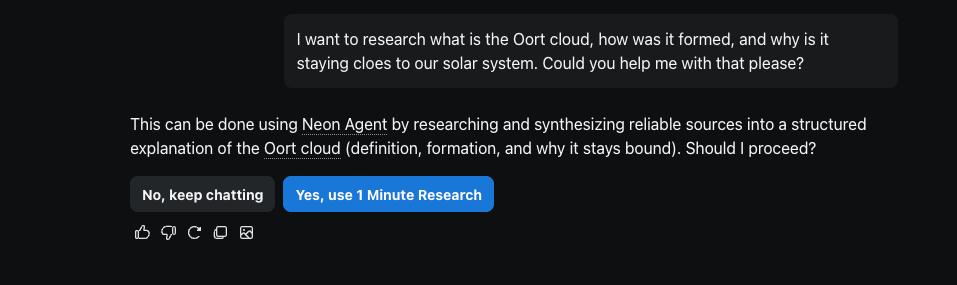
Here you just have to click on “Yes, use 1 Minute Research” – which in this case is the right AI agent for this prompt – or alternatively send a message in the chat stating what you want Opera Neon to accomplish. That’s all you need to do.
You can always just keep your query in Neon Chat either by clicking on “No, keep chatting” or, then again, stating it in the chat.
A couple things to bear in mind when using Opera Neon and the agent suggestion appears:
- If you proceed with Neon Do, then the conversation you were in will reopen in a new tab using Neon Do.
- If you decide to proceed with Neon Make, you’ll be taken directly to the Make interface in the browser.
- If you choose to use 1 Minute Research, then Opera Neon will create a new chat with this specific AI agent in it, and the previous chat will be preserved.
Listening to your feedback
We’re constantly listening to what you have to say about Opera Neon, and one of the things that you were loud and clear about was that you are “unsure of which AI agent to use.” So we fixed it.
Some of you expressed that you were confused or slowed down by having to pick a specific AI agent. Well, not anymore. This update presents an AI experience where you can simply start typing, and the system intelligently understands what you want and suggests the best agent to get it done.
If you want to engage with the Neon community and share your feedback, you’re welcome to join our Discord server with a very dedicated team behind it, ready to engage with you and hear what you’ve got in mind regarding Opera Neon and AI in general. We’re all just a bunch of AI nerds in there 🤓.
Get Opera Neon and become an AI poweruser
This small update brings down one of the access barriers that we’ve noticed you were facing the most, and lets you become an AI power user without needing to know what each AI agent is better for. You can download and subscribe to Opera Neon here.

User comments
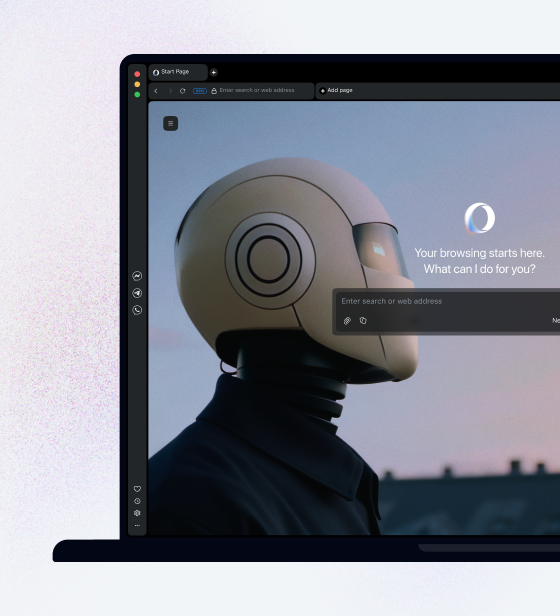
Turn ideas into action
Chat, create, and get things done with Opera Neon, the AI-powered browser that researches, builds, and acts for you.


You deserve a better browser
Opera's free VPN, Ad blocker, and Flow file sharing. Just a few of the must-have features built into Opera for faster, smoother and distraction-free browsing designed to improve your online experience.