
Opera GX Introduces Paste Protect
Share


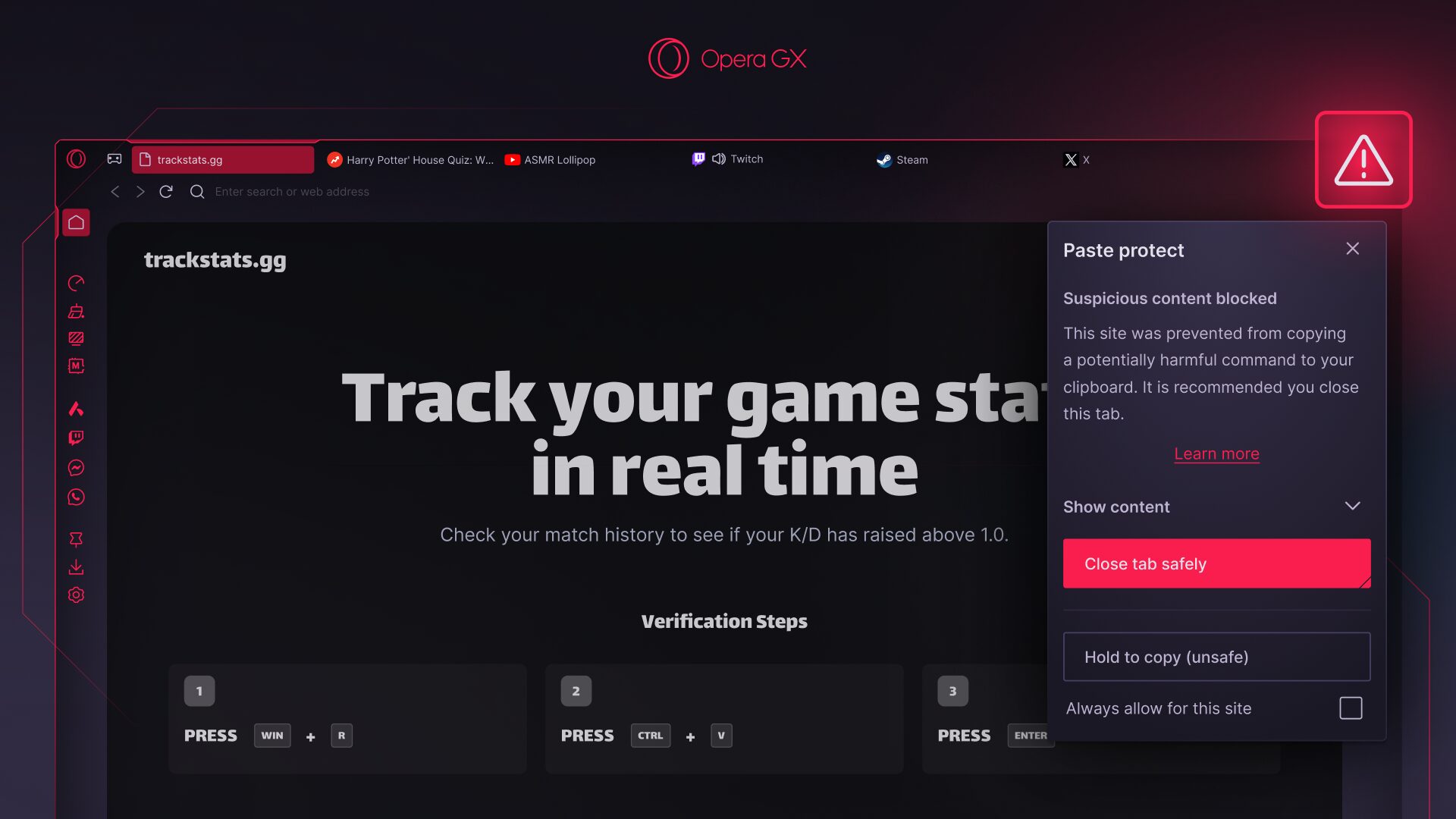
We’ve got an important update landing today in Opera GX that’s designed to keep you safe from shady actors on the web: Paste Protect. In short, would-be hackers are out there trying to engineer malicious code injections so you’ll unknowingly grant them access to your system or data. Paste Protect – a browser-native feature that only Opera has – is there to block that.
Wait, what?
So what is this, what’s going on? Let’s say you’ve somehow ended up on a malicious website (not that you’d ever do that!). Suddenly, a huge red pop-up lights up your screen, warning you that some certificate is out of date, or that your computer is at risk from a virus. Oh no! But there’s more. The message tells you that you only have to follow a few simple steps to secure your system again. This usually involves pressing Win+R to open your computer’s Run window, then pressing Ctrl+V to paste something on it and run it. Phew! All good, right? Well no.
What that site did was either replace something you copied with a malicious version, or place potentially harmful commands on your clipboard. Then it tricked you into pasting them onto your Run window or your Terminal (if you’re on Mac). So without realizing it, you’ve downloaded malware, had your credentials stolen, allowed the installation of remote access software, et cetera. And what’s worse? You were tricked into doing it yourself.
These new attacks (like ClickFix) are some of the fastest-growing techniques on the web. They can come in a variety of forms – a “failed security check,” a video cannot be played, even a CAPTCHA verification that requires additional steps – and they’re fooling a lot of people. And, since the attack relies on you, the user, to carry it out, no browser has a native defense against it. Or, no browser had one – until now.
What Does Paste Protect Do?
Paste Protect prevents these kinds of attacks in two ways:
- It actively prevents the malicious code from being copied onto your clipboard.
- It lets you know that there was an attempt to copy something onto your clipboard that’s potentially harmful.
So every time you copy something to your clipboard within Opera GX, the browser checks the content for potential threats and harmful commands. The check happens locally in your browser, and Paste Protect never reads nor stores the content of what you copy. If a potential threat is detected, Opera GX will automatically block the copying of the malicious content onto your clipboard and provide you with the option to close the site safely.
Not only that, but a warning sign will appear in the address bar as well as a popup telling you that a threat was blocked. We’ll then recommend that you close the website.
Those are the hard facts, but if you’d like to know more you can read our Desktop or Security blogs to better understand what a ClickFix attack is and how Paste Protect blocks it. But it’s important to know that there’s nothing you need to do right now: Paste Protect is on by default, so you’re protected right out of the box (though you can turn it off in the settings if you wish).
So don’t fret about whatever it is (we don’t want to know) that you’ve copied online – browse with Opera GX today.

User comments
Make the web your playground
No lag, no clutter, just play. Squad up on Discord, stream on Twitch, and sprinkle GX with mods to make it your own.




You deserve a better browser
Opera's free VPN, Ad blocker, and Flow file sharing. Just a few of the must-have features built into Opera for faster, smoother and distraction-free browsing designed to improve your online experience.