
Here’s how Opera’s Paste Protect guards you natively against clipboard attacks
Share


At Opera, user security is a top priority. That’s why today, we are excited to announce that Opera is the first browser to introduce Paste Protect: a native defense measure against malicious takeover of your clipboard, which includes code injection attacks such as ClickFix.
Paste Protect helps identify situations where malicious websites attempt to either replace something you copied with a malicious version or place potentially harmful commands on your clipboard and later trick you into pasting them onto a terminal. When any kind of suspicious clipboard activity is detected, Opera’s Paste Protect warns users before dangerous content can be executed.
By introducing Paste Protect, Opera is taking a proactive approach to defending users against some of the fastest-growing attack techniques on the web. ClickFix is a growing form of social engineering attack that tricks users into running malicious commands on their own devices. In 2025, it was responsible for over 53% of all malware loader activity, according to a report by cybersecurity firm Huntress.
While there are extensions that try to mitigate such attacks, and warning systems are featured in some operating systems, Paste Protect is built directly into the Opera browser – the first line of defense before a malicious command even makes it to your clipboard. It is also enabled by default, meaning users are protected automatically without needing to configure anything.
Paste Protect combines Opera’s already existing Hijack protection feature with a new and unique Injection protection element.
Hijack protection, which we introduced in 2021, protected your clipboard from hijack attempts – e.g. replacing a URL you copied with a different one that takes to a malicious site, or replacing a bank account number you’re trying to transfer to with a different one.
Added to this is Injection protection, which, in a first for major browsers, is specifically designed to head off ClickFix-based attacks. In this blog, we will get into some more detail about what these attacks are and how they work, and how Opera protects users from them. Our goal is to make users more aware of these threats and give them the knowledge they need to stay safe online.
So, let’s dive into it!
What is a ClickFix-based attack?
This kind of attack typically begins with a fake message displayed on a website. The page may claim that there is a problem with your browser, that a security check has failed, that a video cannot be played, or that a CAPTCHA verification requires additional steps.
Users are then instructed to click a button and follow a series of steps that often involve opening a terminal and pasting a command there. Often, these notifications will try to urge the user towards action so the user doesn’t have time to think; there might be a timer counting down, language that urges the user to act immediately, or messaging that suggests the risk should not be ignored.
The clipboard, which holds the information you copy using Ctrl+C/Cmd+C on your system, is targeted for this attack because it makes it easy to move such information between applications without having to retype it. Since the clipboard is not considered a suspicious app, existing defenses such as antivirus software and email filters aren’t much good at preventing such an attack – the user is tricked into performing the attack themselves. The call is coming from inside the house, so to speak.
The result of such misuse? Malware being downloaded, credentials being stolen, remote access software being installed, or the device being compromised. In short, a fatal compromise of your system by an attacker. The ultimate goal of ClickFix-based attacks is usually to gain unauthorized access to a user’s system, data, accounts, or financial information.
That’s where Paste Protect’s Injection protection comes in.
An all-around protection system for your clipboard
By recognizing that the browser clipboard is the final layer before the execution of malicious scripts/commands, we developed a method to monitor and intercept malicious payloads at the browser level.
Hijack protection
Hijack protection prevents external applications from replacing something you copied with data that can harm your system without you realizing. It stops them from pasting something different (and nastier) than what you copied, basically.
Say you are trying to make a payment through your online banking, for example. You might have the intended recipient’s IBAN number handy somewhere, like an email or a text file on your desktop. You know the drill; you highlight the bank account number, hit Copy, and then paste it in the relevant text field on your bank’s website.
But if an attacker has compromised your clipboard, they can replace what you copied with their own version – in this case, an alternative bank account number. If you’re not paying attention, you’ve sent the money to a whole different account, where it might be difficult to recover.
Hijack protection detects when you have copied potentially sensitive information (say, an IBAN number) and lets you know with a pop-up that it has been securely copied. It also informs you whether something tried to replace the content that you copied.
And introducing Injection protection
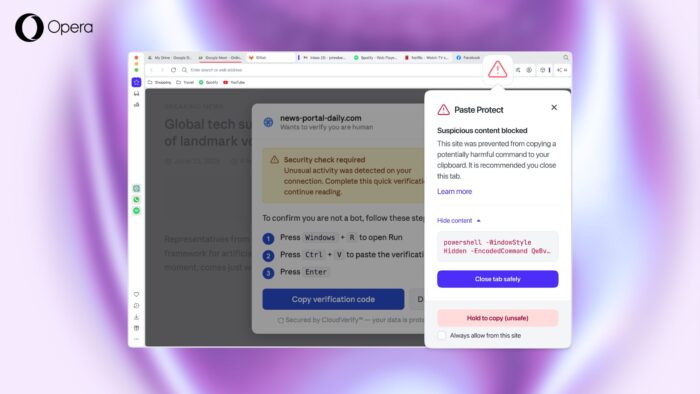
The new Injection protection mode works a bit differently: It intercepts malicious commands that might have been automatically copied, or that the user might have been tricked to copy, before they reach the clipboard. The action is blocked and the user receives an alert through a security popup.
In essence, when you have hit Ctrl+C/Cmd+C on a command that basically says “please hack my system” (or a malicious website has automatically tried to copy it to your clipboard), your Opera browser immediately notices, and lets you know.
Whenever something is copied to your clipboard from within your browser, whether it’s initiated by you or by a website, the system checks the content for potentially harmful commands. It uses platform-specific detection techniques for Windows, macOS, and Linux to identify patterns commonly associated with malicious scripts or commands.
It’s important to note that the check happens locally on your browser, and Opera does not read nor store the contents of your clipboard.
If a potential threat is detected, the copy action is automatically blocked. You’ll see a popup explaining what happened, and a red warning icon will appear in the address bar. In most cases, the recommended action is to close the tab.
If you’re curious, you can still see more information by clicking ‘Show Content’ in the popup to view the beginning of the blocked script (up to the first 120 characters). If you’re confident the content is safe and you actually intended to copy it, you can override the protection by using the “Hold to Copy” option for more than 5 seconds.
If you really know what you’re doing, for example if you’re a developer who regularly copies scripts or commands from trusted sources like GitHub, you can also set trusted websites where it’s allowed to copy scripts by selecting “Always allow from this site” in the popup.
Opera’s Paste Protect as a unified clipboard safety system
Paste Protect is activated on your Opera browser by default. If you wish to toggle it on and off, you can find the relevant buttons in your browser Settings -> Privacy & Security -> Paste Protect. From there, you can also whitelist websites that you trust so that you don’t get Injection protection alerts triggered accidentally.
With Paste Protect, Opera users are some of the most well-guarded browser users out there against ClickFix-based attacks. However, attackers’ methods evolve all the time, and no system can catch all of them all the time. You, the user, are always the last line of defense.
As a general rule, don’t forget to always be cautious when instructed to copy and paste commands at any point – especially if you do not fully understand what a command does, and even more especially if you’re not experienced at typing commands into your device’s terminal. Always exercise reasonable care when browsing.
As always, stay safe out there!

User comments
You deserve abetter browser
Faster, safer and smarter than default browsers. Fully-featured for privacy, security, and so much more.






You deserve a better browser
Opera's free VPN, Ad blocker, and Flow file sharing. Just a few of the must-have features built into Opera for faster, smoother and distraction-free browsing designed to improve your online experience.