
Opera Free VPN will now protect you automatically on public networks. Here’s how it works
Share


We know how busy life can get. Whether you’re on the go working from a library or a cafe, or traveling through airports, you want to be focused on what’s important and not have to think about any extra steps to stay protected online. That’s why Opera’s free, built-in VPN will now automatically activate when it detects that you’re connected to a public Wi-Fi network!
We always strive to make privacy more convenient and accessible for users, so we are very excited to implement this highly-anticipated function to help users stay protected without having to worry or remember any extra steps.
We’ll be rolling this out to users based in the United States and France first. Here’s an overview of how it works and why you need it.
Why do I need VPN protection when using public Wi-Fi?
Public networks often carry additional security risks as they increase the chances of exposing your browsing traffic to malicious attackers and trackers who are on the same network. Opera VPN is there to protect you by creating a secure tunnel for your browser traffic and masking your IP address to hide your location. It also encrypts all your browsing data with AES-256 bit encryption – the industry standard for data protection.
Best of all: It’s completely free, it doesn’t require you to log in or make an account, it’s unlimited, and it’s built into the Opera browser, ready to help protect your browsing activity.
How will Opera VPN’s automatic protection for public networks work?
The built-in, free Opera VPN now gives you an extra layer of privacy by automatically enabling itself when it detects that you’re connected to a public network. In other words, if you forget to turn on your VPN when you connect to a public Wi-Fi, say at an airport or a cafe, Opera VPN will do it for you.
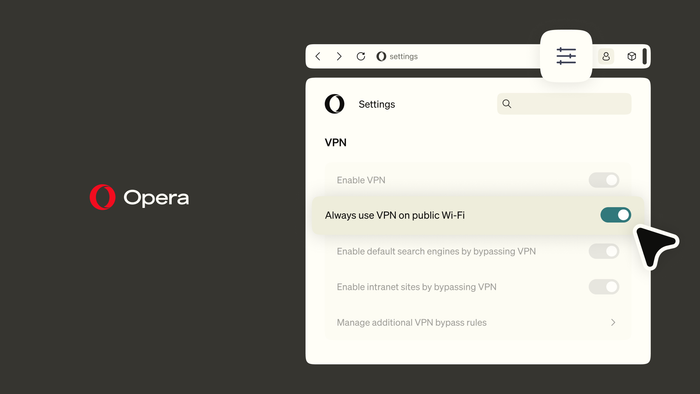
While the feature is meant to work automatically, you have full control – this function will be OFF by default. We believe privacy should always be in your hands, which is why you’ll need to manually enable the feature in your browser settings. Once enabled, Opera will automatically activate the VPN when it detects a public network to ensure you stay protected.
As an indicator to show that the VPN is on when your device connects to a public Wi-Fi, you will see a change in colour of your VPN button in your tab bar. If you switch to a non-public network or leave the public Wi-Fi, the VPN will disconnect automatically and will only re-engage when connected to the public network again.
How does Opera VPN know when you’re on a public network?
When you connect to a network, Opera VPN performs a quick check to determine whether it’s a public or private network. This helps the VPN know when to automatically step in and protect your connection. This check doesn’t mean Opera is tracking or logging the networks you connect to. The network information is only used to determine whether the network is public or private and trigger the VPN protection when needed.
To further cement our commitment to privacy, Opera VPN has been independently audited by Deloitte to verify its no-log policy. This means the VPN does not collect or store any of your browsing activity or data. Your browsing is strictly your business.
Head here to find out more about Opera VPN.

User comments

You deserve abetter browser
Faster, safer and smarter than default browsers. Fully-featured for privacy, security, and so much more.






You deserve a better browser
Opera's free VPN, Ad blocker, and Flow file sharing. Just a few of the must-have features built into Opera for faster, smoother and distraction-free browsing designed to improve your online experience.