
How to get an eSIM in Opera One for Android and activate it
Share


Hey all,
If you’re looking to buy and activate an eSIM in Opera One for Android, you’ve come to the right place. We’re not going to cover what an eSIM is and how it can be useful, if you want to know more about that you can check this blog post about it.
If you’re here it’s because you want to know how to get the eSIM and how to activate it, so let’s jump right into it.
Getting an eSIM in Opera One for Android
Some things you’ll need to consider before getting an eSIM:
- Download the latest version of Opera for Android (or update it if you haven’t).
- Your phone must be running Android 10 or newer.
- Your phone needs to support an eSIM and it must not be carrier-locked – ask your mobile operator if you’re unsure of these.
- Remember that the eSIM can only be bought through the Opera for Android browser, not Opera Mini or Opera GX mobile.
- The eSIM gives internet access to your whole device while you’re abroad.
Those things being said, here’s how you can get an Opera eSIM from the browser:
- Open the Opera browser on your Android phone.
- Tap on the profile icon at the bottom right of your screen (or at the top right if you’re viewing the tab strip).
- Scroll down and select the eSIM option.
- Choose the country you’re traveling to (your destination country).
- Choose the amount of data you want to purchase. There are three plans: 3GB, 5GB, and 10GB – all of them will be valid for 30 days or until you consume all the data.
- Enter your payment details and check out.
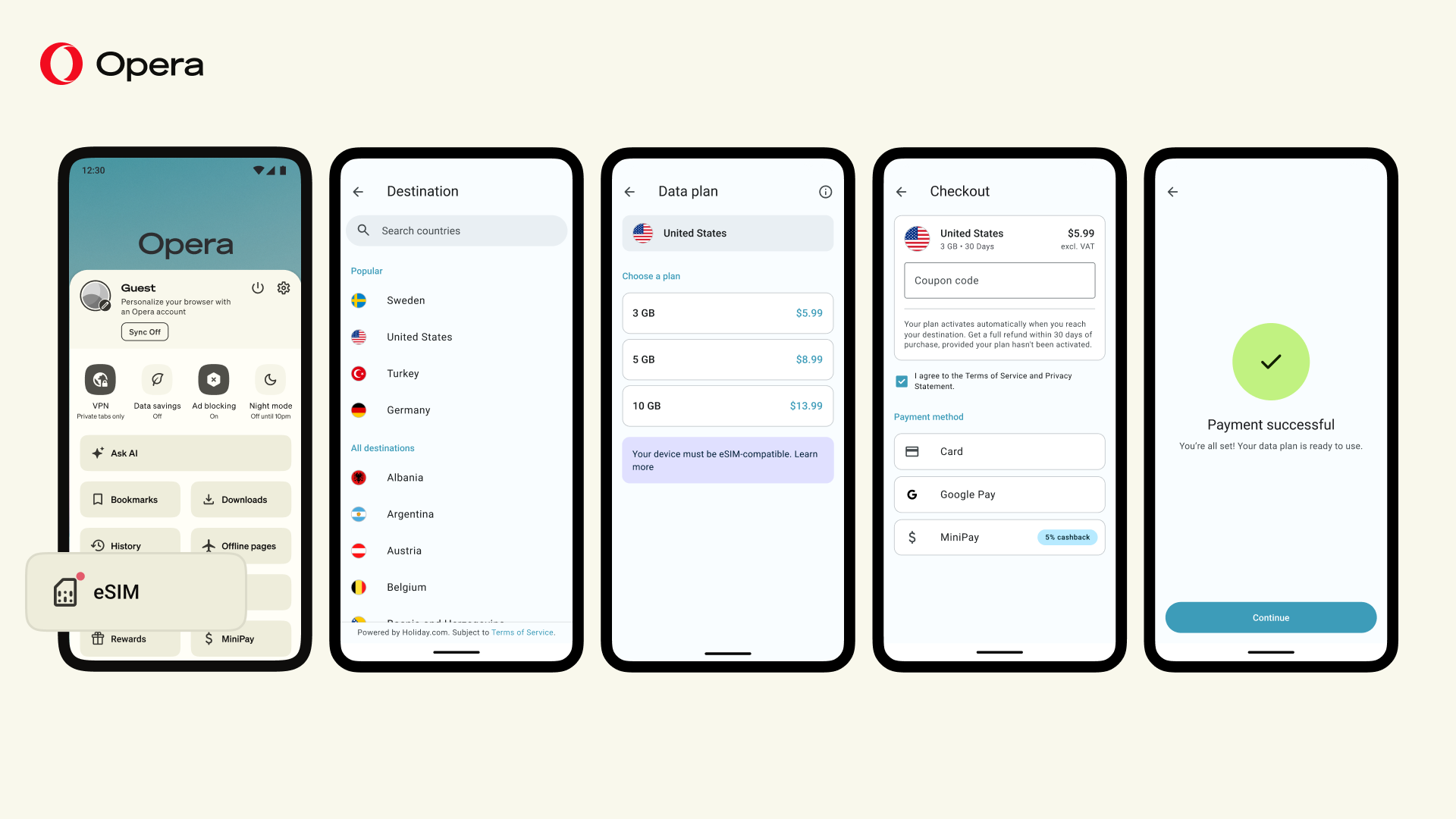
That’s it. Next, your phone will prompt you to install the eSIM. How this looks can depend on your phone model, so follow the instructions carefully. Do this installation on a stable connection before you travel.
You don’t need to do anything to activate it. The eSIM activates automatically the first time it connects to a network in your destination country, and that’s when your plan starts. When you land, make sure the eSIM is turned on and selected for mobile data in your phone’s SIM settings, and turn off data roaming on your regular SIM to avoid roaming charges.

User comments
You deserve abetter browser
Faster, safer and smarter than default browsers. Fully-featured for privacy, security, and so much more.


You deserve a better browser
Opera's free VPN, Ad blocker, and Flow file sharing. Just a few of the must-have features built into Opera for faster, smoother and distraction-free browsing designed to improve your online experience.