
How to choose the right VPN for you
Share



You probably already know why you want a VPN: more privacy, changing your virtual location, or extra protection on public Wi-Fi. The hardest part is choosing. Free VPN or paid VPN? Browser VPN or device-wide VPN? Here’s how to choose the right VPN for the way you actually use the internet.
You might want to browse as if you’re somewhere else in the world. Or maybe you work on the go and want an extra layer of protection when you’re connected to public Wi-Fi in cafes, airports, libraries, or wherever.
But then you start looking. Free or paid? Browser-based or device-wide? Five locations or fifty? There are hundreds of providers making big promises. The easiest way to cut through is to stop looking for the “best VPN” and start with the features you actually need.
What does a VPN do?
A VPN masks your IP address from websites and encrypts traffic between your browser or device and the VPN server. This helps to hide your approximate location and gives the local network less visibility into your browsing.
HTTPS already encrypts the details you give to websites, but a VPN adds another encrypted layer between you and its server.
Free VPN or paid VPN?
Ask yourself: How often will you use it? Do you need it for just browser activity, or should it cover any other apps on your device? Do you need any specific locations? Is another monthly subscription really worth it?
A browser VPN might be enough if most of your online activity happens in tabs. Additionally, a device-wide VPN covers traffic from apps outside your browser.
If most of what you want a VPN for happens on websites—researching, shopping, filling in forms, or working across tabs—then look for a free browser VPN.
Opera One’s Free VPN is built for exactly that. We’ll compare it with other options below.
A paid, device-wide VPN makes more sense if it’s vital to your everyday work, or if you need a choice of specific locations, stream a lot of content, or want VPN coverage across apps like email and file-sync tools running in the background when you connect to public Wi-Fi.
Look out for which devices the service supports, whether it caps your data, and if any apps or traffic are excluded.
When it comes to VPNs, have a clear idea of what you need covered before you put any money down.
What should you look for in a free browser VPN?
Look for a built-in VPN rather than adding an extension.
Why? Because it’s one less tool to install and manually update, one less set of permissions to approve, and one less provider to trust with your browsing data.
Take a closer look at what you’re being promised. Here’s how to make sense of some of the big claims you’ll see when shopping around:
- “Total anonymity” – websites still know who you are when you sign in to your usual accounts.
- “Access anything” – some sites restrict VPN connections.
- “Complete protection” – a VPN doesn’t make a phishing link safe to open.
These limits don’t make a VPN less useful; they just help you see the difference between a solid service you can trust and an impressive sales pitch.
Look for a clear no-logs policy explaining what the provider does and doesn’t record about your activity. Then check for an independent audit that backs up those claims.
Check whether you need to create an account, too. Giving a VPN provider your email address – or your payment details – doesn’t really match the anonymity you’re looking for. It clashes with one of the main reasons you’d use a VPN in the first place: to share less information about yourself online.
An account-free VPN cuts out that step altogether. There’s no information to hand over, no inbox clutter, and no extra login or password to remember.
You want evidence you can assess, not just catchy, reassuring words.
Which browser VPN should you choose?
If you rule out extensions, your list of options gets a lot shorter. But VPNs built into browsers still come with different limits and conditions.
Brave’s VPN is a paid feature. Firefox gives you 50 GB of VPN data each month, while Edge Secure Network gives you just 5 GB. Both Firefox and Edge require you to create an account before you can start using them.
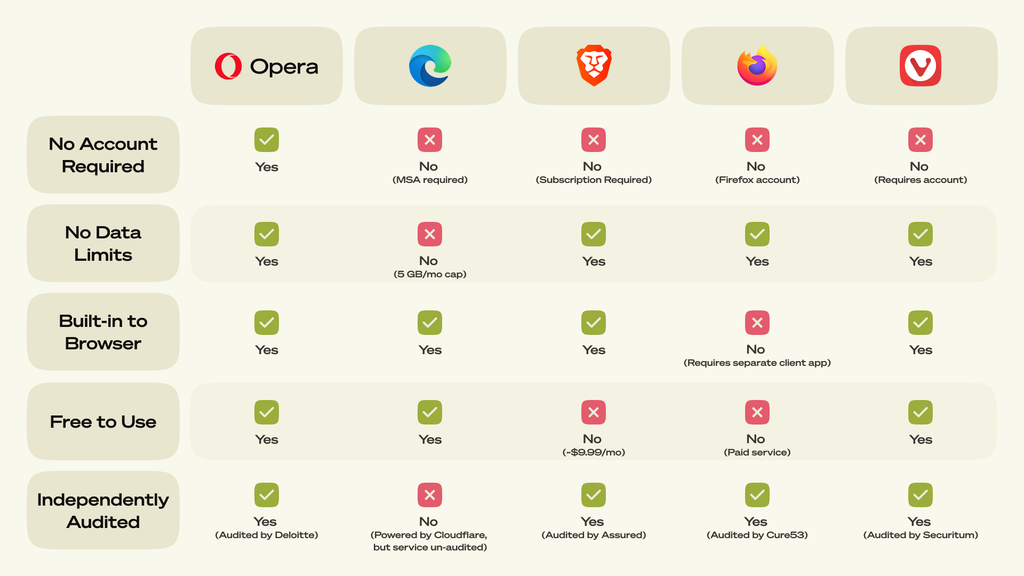
If you want a VPN to cover just your browser, and you want it for free, Opera One is hard to beat.
Why choose Opera’s free VPN?
With Opera One’s Free VPN, there’s no VPN data cap, no trial period counting down, and no extension to install.
Plus, Opera’s no-logs policy was independently audited by Deloitte, which examined the VPN’s infrastructure, server configurations, and supporting documentation.
Opera gives you more privacy without giving you another account to manage.
Getting started takes just a few seconds. Open Settings, search for VPN, and enable it. A VPN badge will then appear beside the address bar, where you can check your connection, switch the VPN on or off with one click, and choose between three virtual locations: the U.S., the Netherlands, and Singapore.
The VPN also sits inside a browser with other useful privacy tools already built in. Opera One’s free Ad blocker helps clear distracting ads from pages, while its Tracker blocker limits the trackers following your activity across the web.
So, you wouldn’t be downloading a browser just to get a VPN. You’d get a browser designed to give you more control over how you browse from the moment you open it.

User comments
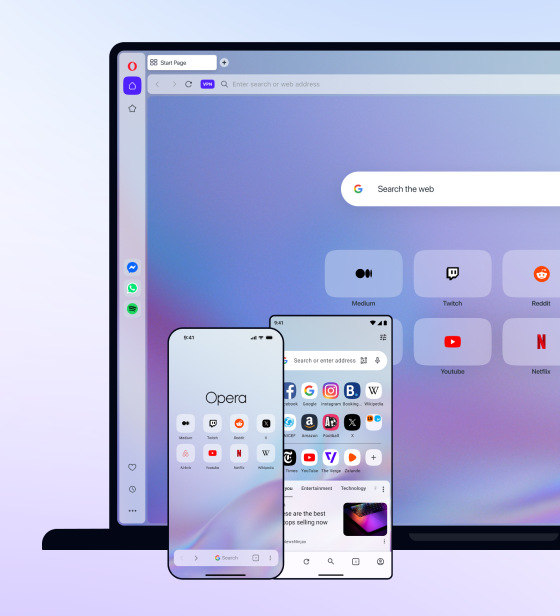
You deserve abetter browser
Faster, safer and smarter than default browsers. Fully-featured for privacy, security, and so much more.




You deserve a better browser
Opera's free VPN, Ad blocker, and Flow file sharing. Just a few of the must-have features built into Opera for faster, smoother and distraction-free browsing designed to improve your online experience.